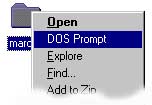
Sometimes navigating the file tree using icons is convenient, but power-users like to use the DOS shell for real work. With a little bit of tweaking, you can have the best of both worlds.
doskey x=explorer .Of course, you can choose whatever you like. Once you have set this up, you will be able to instantly bring up an icon view of whatever directory you happen to be looking at in your DOS box.
One of the major advantages of using icons to navigate your file system is that it is quick to get to a deeply nested directory. But once you get there, wouldn't it be nice if you could open a DOS shell in that directory?
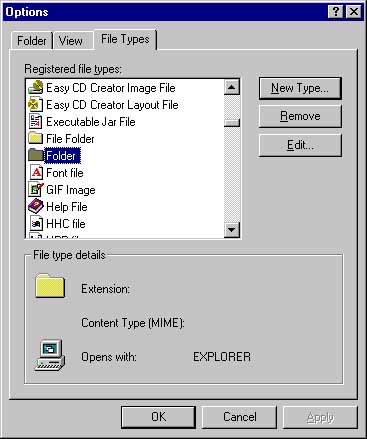
With a little bit of fudging around, this can be done. From an Explorer window (such as "My Computer"), choose "Options..." from the "View" menu to bring up the Options panel. From the File Types tag, search through the file types until you find "Folder". Notice that by default, folders are opened with Explorer.
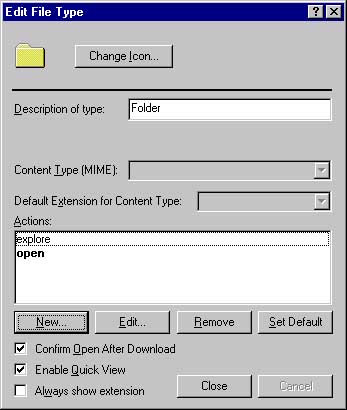
%windir%\System32\cmd.exe /K "cd %1"
in the application field:
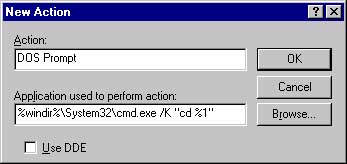
%windir%. If this does not work for you use, the full path
to your System32 directory instead.
Thanks to Jean-Luc for pointing this out
Once you have done this, you will have a new "DOS Prompt" option in the contextual menu you get when you right-click on a folder. Select this, and voilà! -- You'll have a DOS box exactly where you need it!
If you have problems removing or editing the "DOS Prompt" option, don't panic! There is an easy way to remove it. Unfortunately, doing so does require using the registry editor (ok, now panic). Here are the instructions.