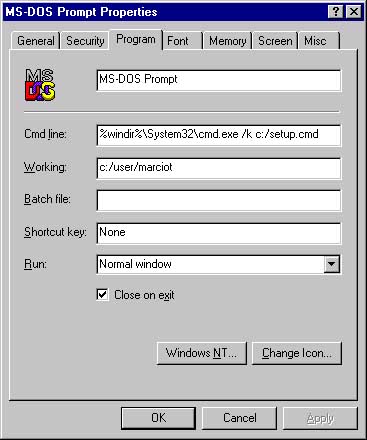
Having a startup script for all your DOS boxes allows you to do common tasks such as setting environment variables and your path. Unfortunately, Windows NT 4.0 DOS boxes are broken in that they ignore the AUTOEXEC.BAT and their "Batch File" property mysteriously has no effect.
There is a way around this limitation, however. Configure the property sheet of your "Command Prompt" shortcut as follows:
The trick here is the /K option to the "cmd.exe" command, that allows you to specify your startup batch file as the initial command. Your startup file, or course, can do anything your heart desires. Here is a sample startup that probably won't work on your system, but will give you a starting point for your own startup files:
@echo off
rem Setup file for DOS Boxes

echo Setting up environment variables for C++
call C:\PROGRA~1\MICROS~1\VC98\Bin\Vcvars32.bat

echo Setting up environment for Java
set CLASSPATH=C:\jdk1.2.1\jre\lib;.
set PATH="C:\jdk1.2.1\bin";%PATH%

doskey ls=dir
More info: Type cmd.exe at the prompt
or lookup "cmd command" in the Windows NT help index.